Classifier

Classify text and images with the labels you choose.

APIPricing

Classifier API

Explore the API. Make a real request. Use the code in your application.

API Key & UsageMore

Classification mode

classifier_id / model

Use labels directly or a previously trained classifier.

Labels

labels

Separate category labels with commas.

RequestPOST
curl 'https://chatsax.com/v1/classify' \
  -X 'POST' \
  -H 'Content-Type: application/json' \
  -H "Authorization: Bearer $CHATSAX_API_KEY" \
  --data-binary '{
  "model": "",
  "input": [
    "",
    "",
    ""
  ],
  "labels": [
    "Simple task",
    "Complex reasoning",
    "Creative writing"
  ]
}'
Your response will appear here.

Your API key

Use this key right away. Sign in to manage your account.

What is Classifier?

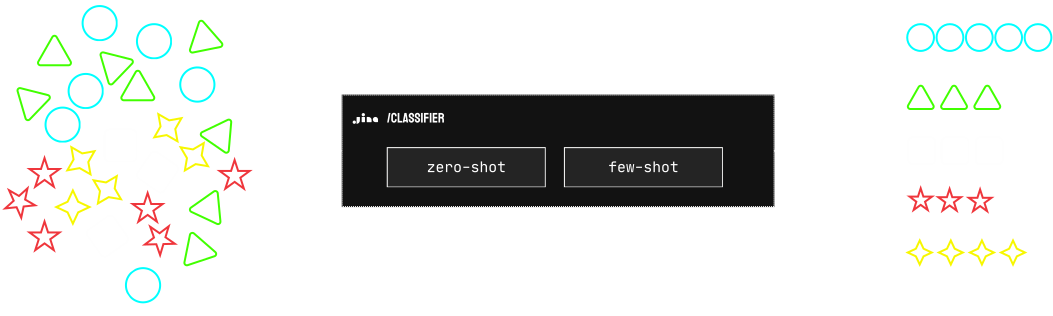
Classification turns text or supported images into a set of labels your application understands. A shared embedding model provides the representation; your categories define the task.

Text and image classification
Source: Jina AI

When to use zero-shot or few-shot?

Zero-shot classification

Start with meaningful category names when you have no labeled examples. This is useful for exploring a taxonomy or routing content into broad topics. Evaluate the labels on representative inputs before using them in production.

Try zero-shot classification

Few-shot classification

Use labeled examples when your categories depend on domain-specific language or distinctions that names alone do not express. Train a classifier, keep its identifier, then classify new content with that resource.

Train a classifier

API pricing

Your API key

Use this key right away. Sign in to manage your account.

Toy Experiment
10Million
FreeNo login required
  • Search Foundation
  • Shared token balance
  • Usage tracking
Most popular
Production
1Billion
$50.00one-time purchase
  • All Chatsax APIs
  • Shared token balance
  • Usage tracking
Scale Up
11Billion
$500.00one-time purchase
  • All Chatsax APIs
  • Shared token balance
  • Usage tracking
Log in to manage your balance, keys and billing history.
Rate limits & token usage

Default application keys allow 60 requests per minute and 10,000 requests per day. All keys in an account share its prepaid balance. Usage is settled from provider-reported tokens.

View rate limit details

Rate limits

Your key’s assigned limits apply alongside the provider’s service capacity. Check the dashboard for the limits currently active on your account.

ServiceMethodUsage basis
ReaderGET / POSTOutput tokens
SearchGET / POSTSearch request and content
EmbeddingsPOSTInput tokens and modalities
RerankerPOSTQuery and candidate documents

Frequently asked questions

API questions

Why is the first request for some models slow?

Some hosted models may need to load or initialize before serving a request. Latency also depends on the input size and current service load. Keep a timeout suited to the workload and inspect errors before retrying.

Can one Chatsax key access several APIs?

A key can access the services assigned to its scopes. Review the key in the dashboard before sharing it with an application.

Where can I review my usage?

Open the key manager to inspect recorded requests, status, latency, and available usage data for the selected key.

What if I lose a key?

Sign in to manage your keys. If a key may be exposed, revoke it and update the applications that use it.

Do keys expire?

Access follows the expiry and status configured for the key. A key that is revoked or expired cannot be used for new requests.

Can tokens be moved between keys?

Use only the transfer options available in your account. Do not assume that provider balances and Chatsax balances are interchangeable.

Can I revoke an API key?

Use the key manager. Revocation stops future access, so update any dependent applications before retiring a key.

Are my documents used to train models?

Check the platform privacy terms and the selected provider’s policy. Avoid sending material your organization has not approved for that service.

How do I handle rate limits?

Use the status and retry information returned by the API. Add backoff and control concurrency instead of continuously retrying the same request.

Can I process a large collection asynchronously?

The batch workflow supports submitting a job, checking its status, and downloading its output when the selected provider completes it.

Is Chatsax operated by Jina AI?

Chatsax is independently operated. The current model APIs are provided by Jina, whose papers and model cards are linked for reference.

How do I get an API key?

Open the dashboard to receive a visitor API key automatically. Copy it into your application or try a request immediately. Sign in when you want to manage an account and add tokens.

Get an API key

Billing questions

Is usage counted by sentences or requests?

Each service has its own metering rules. Reading, search, embedding, and generation can count different units; review the active pricing before use.

How do I get started?

Open the dashboard to receive a visitor key automatically. Sign in when you need account management or token purchases. The account screen shows your available balance and access.

Can an interrupted request consume resources?

The provider may have processed work before the connection ended. Review the recorded usage and billing status rather than inferring them from a closed browser tab.

Which payment methods are available?

The checkout screen displays payment methods available for your region, currency, and account.

Where can I find a receipt or invoice?

Use the billing portal linked from your account, and retain the payment confirmation associated with the purchase.

Does buying API credit grant a model license?

No. API credit pays for hosted usage. Downloading and commercially running model weights follows the model’s separate license.

Can I discuss a larger deployment?

Use the contact page to describe the services, traffic, latency, and deployment requirements you need.

Why is the balance different from what I expected?

Check the selected account and key, the payment status, and the latest usage records. Keep the payment reference when contacting support.

How do I manage future charges?

Use the billing controls provided in the account or payment portal. Check the confirmation after changing an automatic payment setting.