Initial retrieval
Use vectors, keywords, or a hybrid retriever to collect plausible candidates.
 chatsaxSearch foundation
Explore the API. Make a real request. Use the code in your application.
top_nNumber of ranked documents to return.
return_documentsInclude original document text alongside scores.
return_embeddingsInclude query and document embeddings.
max_doc_lengthOptional per-document token limit.
curl 'https://chatsax.com/v1/rerank' \
-X 'POST' \
-H 'Content-Type: application/json' \
-H "Authorization: Bearer $CHATSAX_API_KEY" \
--data-binary '{
"model": "",
"query": "",
"top_n": 3,
"documents": [
"",
"",
""
],
"return_documents": true
}'Use this key right away. Sign in to manage your account.
A 0.6B model considers candidate documents together. Hybrid attention and self-distillation improve efficiency while preserving the v3 request format.

Use a text query to compare text and image candidates in a single ranking, including pages where layout and visual content carry the answer.
Fast retrieval gives you a candidate set. A reranker examines those candidates more closely so the most useful context comes first.
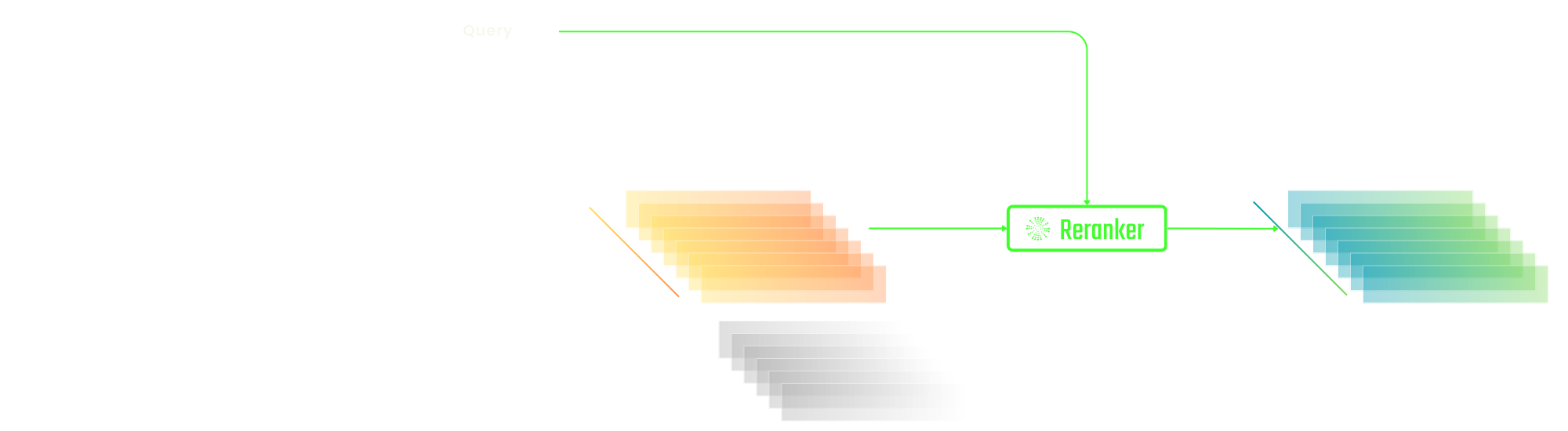
Use vectors, keywords, or a hybrid retriever to collect plausible candidates.
Compare each candidate with the query using a model trained for relevance.
Send the strongest matches to the user or the language model.
Compare queries and documents across the languages supported by your model.
Match a natural-language request with useful code, tools, or function descriptions.
Rank candidate schemas or structured records before the next reasoning step.
Use a hosted API or explore deployment on your own cloud.
Find the provider integration for your vector database, retrieval framework, or application toolkit. Configure your Chatsax endpoint and key where the client supports custom providers.
8 integrationsThese methods can work together: retrieve candidates efficiently, then improve their order.
| Reranker | Vector search | BM25 | |
|---|---|---|---|
| Best suited to | Refine a candidate set | Retrieve semantic matches | Retrieve keyword matches |
| Representation | Query and document interaction | Stored document vectors | Terms and their frequencies |
| Query cost | Higher per candidate | Efficient vector lookup | Efficient inverted-index lookup |
| Indexing | Often uses an existing candidate list | Encode documents before retrieval | Build an inverted index |
| Language and meaning | Detailed relevance matching | Semantic similarity | Exact vocabulary matches |
| Strength | Fine-grained relevance judgments | Scales semantic candidate retrieval | Transparent lexical matching |
| Trade-off | Adds latency after retrieval | May miss subtle query interactions | Can miss synonyms and paraphrases |
| Try the API | Try the API |
Explore the methods, evaluations, and design choices behind the current models.
Open the original publication to review the methods and evaluation.
arXivOpen the original publication to review the methods and evaluation.
AAAI 2026Your key’s assigned limits apply alongside the provider’s service capacity. Check the dashboard for the limits currently active on your account.
| Service | Method | Usage basis |
|---|---|---|
| Reader | GET / POST | Output tokens |
| Search | GET / POST | Search request and content |
| Embeddings | POST | Input tokens and modalities |
| Reranker | POST | Query and candidate documents |
Will you use a hosted API or download model weights?
Usage depends on the selected model and the query–document inputs. Review the response usage and current pricing before estimating a large workload.
v3.5 and v3 compare documents listwise; m0 supports visual candidates; v2 and earlier models offer other size, language, and architecture trade-offs.
Open the model card for its published license. API access and permission to run downloaded weights commercially are separate arrangements.
Multilingual rerankers support cross-language relevance matching. Test the language pairs and document styles important to your application.
Limits vary by model. The v3 family also exposes a document-length setting; reduce long candidates or segment them before reranking.
Use the published API limits and account for the total context of a listwise request. Reducing the candidate set also helps latency.
Measure representative queries with the model, candidate count, and document lengths used in production. A fixed document count alone is not enough.
Available weights and cloud marketplace listings provide deployment paths. Review the model license and the environment’s memory and runtime requirements.
This playground runs published rerankers. Training or adapting the underlying reranker requires a separate training workflow and licensed model assets.
Choose m0 for image candidates and provide readable source images. Very small text or heavily compressed pages can lose information before ranking.
A listwise model sees the query and candidate documents together, allowing the score to reflect relationships among the candidates.
The serving system balances total request size, throughput, and latency. Follow the API schema rather than assuming the model’s theoretical maximum.
Both request frequency and input volume can matter. Queue bursts, limit concurrency, and retry transient rate errors with backoff.
For text, evaluate v3.5 first. For visual documents, evaluate m0. Use a smaller or older model when its license, runtime, or latency better fits the task.
Some hosted models may need to load or initialize before serving a request. Latency also depends on the input size and current service load. Keep a timeout suited to the workload and inspect errors before retrying.
A key can access the services assigned to its scopes. Review the key in the dashboard before sharing it with an application.
Open the key manager to inspect recorded requests, status, latency, and available usage data for the selected key.
Sign in to manage your keys. If a key may be exposed, revoke it and update the applications that use it.
Access follows the expiry and status configured for the key. A key that is revoked or expired cannot be used for new requests.
Use only the transfer options available in your account. Do not assume that provider balances and Chatsax balances are interchangeable.
Use the key manager. Revocation stops future access, so update any dependent applications before retiring a key.
Check the platform privacy terms and the selected provider’s policy. Avoid sending material your organization has not approved for that service.
Use the status and retry information returned by the API. Add backoff and control concurrency instead of continuously retrying the same request.
The batch workflow supports submitting a job, checking its status, and downloading its output when the selected provider completes it.
Chatsax is independently operated. The current model APIs are provided by Jina, whose papers and model cards are linked for reference.
Each service has its own metering rules. Reading, search, embedding, and generation can count different units; review the active pricing before use.
Open the dashboard to receive a visitor key automatically. Sign in when you need account management or token purchases. The account screen shows your available balance and access.
The provider may have processed work before the connection ended. Review the recorded usage and billing status rather than inferring them from a closed browser tab.
The checkout screen displays payment methods available for your region, currency, and account.
Use the billing portal linked from your account, and retain the payment confirmation associated with the purchase.
No. API credit pays for hosted usage. Downloading and commercially running model weights follows the model’s separate license.
Use the contact page to describe the services, traffic, latency, and deployment requirements you need.
Check the selected account and key, the payment status, and the latest usage records. Keep the payment reference when contacting support.
Use the billing controls provided in the account or payment portal. Check the confirmation after changing an automatic payment setting.

'%3e%3cg%20clip-path='url(%23clip1_1855_4873)'%3e%3cpath%20d='M24%2048C37.2548%2048%2048%2037.2548%2048%2024C48%2010.7452%2037.2548%200%2024%200C10.7452%200%200%2010.7452%200%2024C0%2037.2548%2010.7452%2048%2024%2048Z'%20fill='%239995F7'/%3e%3cpath%20d='M34.7344%2013.2656V34.7364H30.1118V21.866L25.8771%2034.7364H22.1563L17.8863%2021.8434V34.7364H13.2637V13.2656H18.7126L24.0406%2028.1337L29.3107%2013.2656H34.7344Z'%20fill='white'/%3e%3c/g%3e%3c/g%3e%3cdefs%3e%3cclipPath%20id='clip0_1855_4873'%3e%3crect%20width='48'%20height='48'%20fill='white'/%3e%3c/clipPath%3e%3cclipPath%20id='clip1_1855_4873'%3e%3crect%20width='48'%20height='48'%20fill='white'/%3e%3c/clipPath%3e%3c/defs%3e%3c/svg%3e)